Start creating

Leap API

Meshy 6 APIMeshy's model, through Leap

Detailed, textured 3D models from an image. One Leap key and one balance run it and every other model, priced per call in dollars.

First $5 top-up, no card fee.

  • One key for every model
  • Every call quoted first
  • A failed call costs nothing
# Upload the image (PNG, JPEG or WebP, up to 4 MB) and keep its ID.FILE_ID=$(curl -s "https://api.tryleap.ai/v1/files?filename=photo.jpg" \  -H "x-api-key: $LEAP_API_KEY" \  -H "content-type: image/jpeg" \  --data-binary @photo.jpg | jq -r .id) # Then run the model with them.jq -n --arg images "$FILE_ID" '{  "model": "meshy/meshy-6",  "input": {    "images": [      $images    ]  }}' \  | curl https://api.tryleap.ai/v1/generations \    -H "x-api-key: $LEAP_API_KEY" \    -H "content-type: application/json" \    -H "prefer: wait=60" \    -d @- # Video often outlasts the wait and answers "queued" or "running".# Put its "id" in GENERATION_ID and read it again until it is done:# curl https://api.tryleap.ai/v1/generations/$GENERATION_ID -H "x-api-key: $LEAP_API_KEY"

Set LEAP_API_KEY and send it. It uploads your image first, since inputs take file IDs, not URLs. With prefer: wait=60 the answer holds the result when the call finishes within a minute; a longer one is read again by its ID.

Model ID
meshy/meshy-6
Price per call
$1.10
This call
A 3D model costs $1.10.
First top-up
A first top-up of $5, with no fee, covers four calls like it.

What it makes

Made with Meshy 6

Real Meshy 6 runs on Leap. Each one passed Leap's media quality check before it was shown.

  • A walnut lounge chair, textured from one photo, a real run on Leap

    A walnut lounge chair, textured from one photo
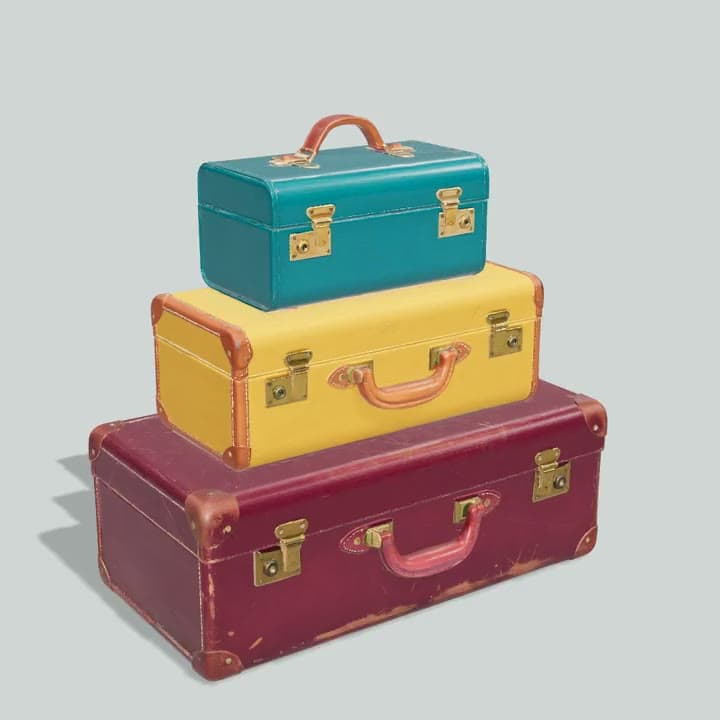
  • Three vintage suitcases, stacked, a real run on Leap

    Three vintage suitcases, stacked

The answer

What comes back

A generation. Check status first: succeeded has the file in output, a signed link that works for 24 hours, so download what you keep. failed has error and failure_cause, and costs nothing. usage.cost_usd is what the call was charged.

200 OK, trimmed
{  "id": "gen_...",  "object": "generation",  "model": "meshy/meshy-6",  "status": "succeeded",  "output": [    {      "type": "3d",      "url": "https://api.tryleap.ai/files/..."    }  ],  "error": null,  "usage": {    "cost_usd": "1.1"  }}

Inputs

What Meshy 6 takes

Only images is needed; everything else has a default. The same schema is public, with no key, at api.tryleap.ai/v1/public/models/meshy/meshy-6.

Imageimages
An image, requiredThe uploaded image to work on, by ID.
Model Typesettings.model_type
Standard, Lowpoly, Smart-topology. Default: StandardType of 3D mesh generation.
Topologysettings.topology
Quad, Triangle. Default: TriangleSpecify the topology of the generated model.
Target Polycountsettings.target_polycount
100 to 300000. Default: 30000Target number of polygons in the generated model.
Symmetry Modesettings.symmetry_mode
Off, Auto, On. Default: AutoControls symmetry behavior during model generation.
Should Remeshsettings.should_remesh
On or off. Default: onWhether to enable the remesh phase
Should Texturesettings.should_texture
On or off. Default: onWhether to generate textures
Enable Pbrsettings.enable_pbr
On or off. Default: offGenerate PBR Maps (metallic, roughness, normal) in addition to base color
Is A T Posesettings.is_a_t_pose
On or off. Default: offDeprecated: use pose_mode instead.
Pose Modesettings.pose_mode
A-pose, T-pose, Pose mode for the generated model.

Pricing

Price per call

A 3D model costs $1.10. A first top-up of $5, with no fee, covers four default calls. Prices are the provider's list price plus our margin (35% on most models, less on the dearest video), read from the catalog, and a quote gives the exact price of any input for free.

A free quote
# With $FILE_ID from the uploads above.jq -n --arg images "$FILE_ID" '{  "model": "meshy/meshy-6",  "input": {    "images": [      $images    ]  }}' \  | curl https://api.tryleap.ai/v1/quotes \    -H "x-api-key: $LEAP_API_KEY" \    -H "content-type: application/json" \    -d @-

How it works

How the Meshy 6 API works

Every model takes the same request, a model ID and its input, and results, prices, failures and limits work the same way for all of them.

  • Wait for it, or hear when it ends

    prefer: wait=60 holds the request until the result is ready, for up to a minute. A longer run is read again by its ID, or a signed webhook tells your server when it ends.

    prefer: wait=60 / "webhook": "https://..."

    In the docs
  • Failed calls cost nothing

    The price is held when a call starts and charged only if it succeeds. A failed or refused call comes back with its failure_cause, and the hold is released.

    "status": "failed" / "failure_cause": "provider_refused"

    In the docs
  • The price before the call

    POST /v1/quotes takes the same body as a generation and returns its exact price, with the input checked, for free. Every result carries what it was charged.

    POST https://api.tryleap.ai/v1/quotes / "cost_usd"

    In the docs
  • Rate limits

    600 requests a minute per API key and 300 per IP address. A 429 carries Retry-After with the seconds to wait.

    RateLimit-Remaining / Retry-After

    In the docs
  • Safe retries

    Send an idempotency key and a retry after a dropped connection returns the same generation instead of starting a second one.

    idempotency-key: <uuid>

    In the docs
  • Batches

    POST /v1/batches starts up to 50 calls in one request, priced and held together, so either all start or none do.

    POST https://api.tryleap.ai/v1/batches

    In the docs

MCP

Or let your agent call it.

Leap's MCP server lets Claude Code, Claude, VS Code and other MCP clients run Meshy 6, read its inputs and fetch the result, on your balance. Signing in happens in the browser, so there is no key to paste.

Add Leap to Claude Code
claude mcp add --transport http leap https://app.tryleap.ai/api/mcp

Claude Code signs you in through the browser the first time it calls Leap.

Teach your coding agent the Leap API
curl -fsSL https://www.tryleap.ai/install.sh | sh

Installs the Leap skill for every coding agent it finds: which endpoint to call, how to read a model's inputs, when to wait and when to poll.

Questions

Meshy 6 API questions

How much does the Meshy 6 API cost?
A 3D model costs $1.10. That is the provider's list price plus our margin, the same as in the studio. POST /v1/quotes prices any input for free before you run it.
Can I try the Meshy 6 API for free?
No. API keys run on paid credit, so a key's first call needs a top-up, and quotes are free. A 3D model costs $1.10. A first top-up of $5, with no fee, covers four default calls.
Do I pay for calls that fail?
No. The price is held when a call starts and charged only if it succeeds. A call that fails, or that the model's safety filter refuses, comes back with status "failed" and a failure_cause, and the hold is released.
Is this Meshy's own API?
No. Leap is a separate service: it sends your call to Meshy's model and gives you what it makes, so you need no Meshy account. One Leap key runs Meshy 6 and every other model in the catalog, from one balance.
What are the rate limits?
600 requests a minute per API key and 300 a minute per IP address. A batch starts up to 50 calls in one request. A 429 says how long to wait in its Retry-After header.
Can an AI agent call it?
Yes. Leap's MCP server lets Claude Code, Claude, VS Code and other MCP clients find Meshy 6, read its inputs, run it and fetch the result on your balance. The client signs you in through the browser, so there is no key to paste.

Build with Meshy 6.

Keys run on paid credit, and the first top-up has no fee. The same key runs every model on Leap.

Get an API key